
Purchase order approval
Who must approve this purchase order? Answered instantly.
Put your purchase order approval rules in one place: approval limits by cost centre, restricted countries and supplier risk. Your ERP asks who must sign off each PO and gets the answer, with the reason, in milliseconds.
Incoming request
evaluatingWho must approve PO-24019?
- Look up the approval limit for the cost centre: Marketing (CC-100) up to £5,000, Operations (CC-200) up to £25,000, IT (CC-400) up to £40,000
- If the supplier's country is on the Restricted countries list, block the order
- If the supplier risk is High, send the order to compliance review
- If the order total is over the cost centre limit, send it to the director approver
Answer, with the reason
Director approval, by the Finance Director. PO-24019 passes the restricted country and supplier risk checks, but £40,500 is over the IT limit of £40,000, so it goes to the director approver. The trace shows the limit that was found and the rule that fired.
Sound familiar?
Sign-off should not need a detective
Everyone knows approvals matter. Nobody is quite sure who should approve this one.
"Who signs this off again?"
The delegation of authority is a PDF from two years ago. Buyers guess, or forward the PO to three managers and hope one of them approves it.
"It went to the wrong approver"
A £40,500 IT order was approved by the IT manager, whose limit is £40,000. Nobody noticed until the month-end review.
"We didn't know that supplier was high risk"
The risk rating sits in a spreadsheet the buyers never see. An order goes out without the compliance review it needed.
The quiet cost
What loose approvals cost you
- Orders sit waiting while buyers work out who needs to approve them.
- Spend gets approved by people above their authority, and it shows up in the audit.
- Orders to restricted or high-risk suppliers slip through without the right checks.
- Approvers lose hours to POs that were never theirs to sign.
Before and after
From guesswork to the right approver, every time
Today
- Approval limits in a PDF or a spreadsheet
- Buyers decide who to route each PO to
- Supplier country and risk checked by memory, if at all
- No clear record of why a PO went to a given approver
With Condexa
- Approval limits by cost centre in a lookup table finance owns
- The ERP asks Condexa and routes each PO automatically
- Restricted countries and supplier risk checked on every order
- A trace behind every routing decision, ready for audit
How you get there
How every PO reaches the right person
- 1
Your approval matrix, written down once
Finance keeps approval limits by cost centre in a lookup table and restricted countries in a list. When a limit changes, they change one row.
- 2
Confidence it routes correctly
Run real POs through the decision before it goes live. The trace shows the limit it found, the checks it ran and why it chose the approver.
- 3
Approvals that route themselves
Your ERP, Dynamics 365 or Power Apps calls the decision as each PO is raised. The right approver is known in milliseconds, and the reason is recorded.
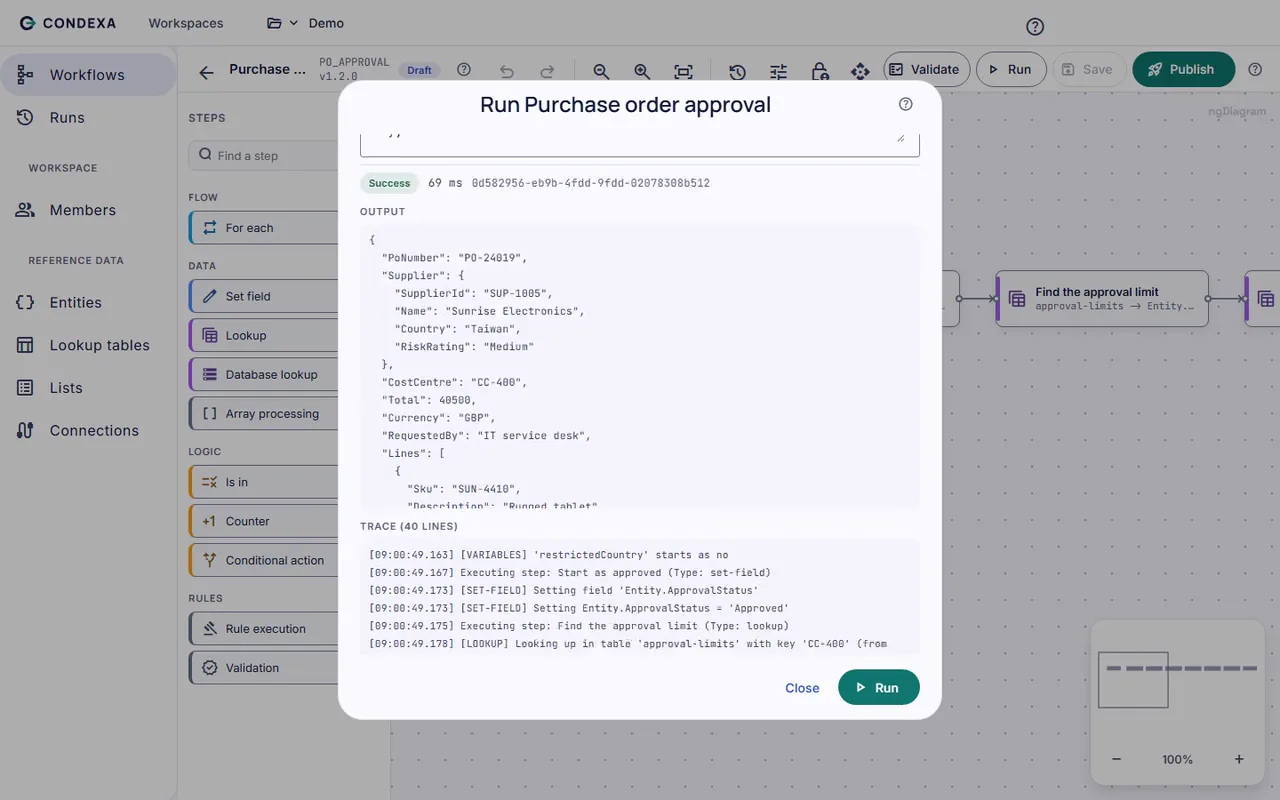
A worked example
Example: PO-24019 from Sunrise Electronics
An IT buyer raises PO-24019 for £40,500 of equipment from Sunrise Electronics, charged to the IT cost centre (CC-400).
The rules, in plain English
- R1Look up the approval limit for the cost centre: Marketing (CC-100) up to £5,000, Operations (CC-200) up to £25,000, IT (CC-400) up to £40,000
- R2If the supplier's country is on the Restricted countries list, block the order
- R3If the supplier risk is High, send the order to compliance review
- R4If the order total is over the cost centre limit, send it to the director approver
Condexa answers
Director approval, by the Finance Director. PO-24019 passes the restricted country and supplier risk checks, but £40,500 is over the IT limit of £40,000, so it goes to the director approver. The trace shows the limit that was found and the rule that fired.
FAQ
Questions people ask
What are purchase order approval rules?
Purchase order approval rules decide who must sign off a PO before it is sent. They usually depend on the order value, the cost centre or budget it is charged to, and checks on the supplier. Writing them down as a decision means every PO is routed the same way.
What is a PO approval matrix?
A PO approval matrix sets out who can approve purchase orders up to what value, often by cost centre or department. For example, a marketing manager might approve up to £5,000 while larger orders go to a director. In Condexa the matrix sits in a lookup table that finance can update.
What is a delegation of authority matrix?
A delegation of authority matrix records which people or roles can commit the business to spend, and up to what limit. It is the policy behind purchase order approvals. Automating it means the limits are applied to every order, not just the ones someone checks.
Can Condexa work with our existing ERP approval workflow?
Yes. Your ERP or approval tool calls Condexa over a REST API and gets back who must approve and why. It works from Dynamics 365 plug-ins, Power Automate, Power Apps or any system that can make a web request, so your existing approval screens stay as they are.
How do we change an approval limit?
Edit the limit in the approval limits lookup table, test a few orders as a draft, and publish. The next PO your ERP sends is checked against the new limit, with no code change and no release.
Keep exploring
Related decisions and guides
Glossary
What is an approval matrix?
An approval matrix is a table that sets out who can approve which kinds of spend, commitment or exception, and up to what limit.
Read moreUse cases
Supplier onboarding
Check every new supplier against the same criteria before the first order, not after something goes wrong.
Read moreIntegrations
Dynamics 365 and Dataverse
Outgrown Dataverse business rules? Run real decisions on live Dataverse data and call them from any app or flow.
Read moreIndustries
Manufacturing and distribution
Orders stuck on credit hold, POs waiting for sign-off, suppliers half onboarded. Decide each one the same way, fast.
Read moreFeatures
Lookup tables
Every limit change is a dev ticket? Put thresholds and bands in tables your business team edits and publishes.
Read moreSee your own approval matrix running in 30 minutes
Bring a decision your team makes every week. We will build it with you, live, test it against your own examples and show your systems calling it.
No slides. Your decision, built live. No obligation.