
Decision trace
See exactly why every decision was made
A decision audit trail that reads like an explanation. Every run shows each step, each lookup and each value, so 'why did the system say that?' has an answer in seconds.
Incoming request
evaluatingWhy was order SO-20514 put on credit hold?
- Step 1 looked up the customer's credit limit: 20,000 GBP.
- Step 2 read the outstanding balance: 8,300 GBP.
- Step 3 added the order to the balance: 22,300 GBP, over the limit.
- Step 4 checked the key accounts list: not found, so no referral.
Answer, with the reason
Hold, on credit limit. The trace shows the order would take the balance 2,300 GBP over the limit, and the customer is not on the key accounts list. Sales can see the reason in seconds, and credit can decide whether to raise the limit.
Sound familiar?
The system said no. Nobody can say why.
Automated decisions save time until someone questions one. Then the time comes back, with interest.
Logs that show the result, not the reason
The record says 'declined'. It does not say which limit was checked, what value it saw or which rule tipped it over.
A developer as the only witness
To explain a decision, someone has to read the code, rebuild the data from that day and hope nothing has changed since.
Audit asked why
An auditor picks ten approvals at random and asks how each was reached. You spend a week rebuilding answers that should have been on file.
The quiet cost
What an unexplained decision really costs
- A customer complaint that drags on because you cannot show your reasoning.
- A sales team that stops trusting the system and starts working around it.
- An audit finding for a control you do have but cannot evidence.
- Hours of developer time spent on questions the business should answer itself.
Before and after
From 'let me look into it' to 'here is exactly why'
Today
- You can see what the system decided but not how.
- Explaining an outcome means a ticket to IT.
- Testing a rule means trying it live and watching.
- Past decisions are rebuilt from memory and old data.
With Condexa
- Every run shows the path it took, step by step.
- Anyone with access opens the run and reads the reason.
- You test with example values and read the trace before publishing.
- Past runs are kept with their inputs, outputs and trace.
How you get there
How the decision trace works
- 1
Test with your own examples
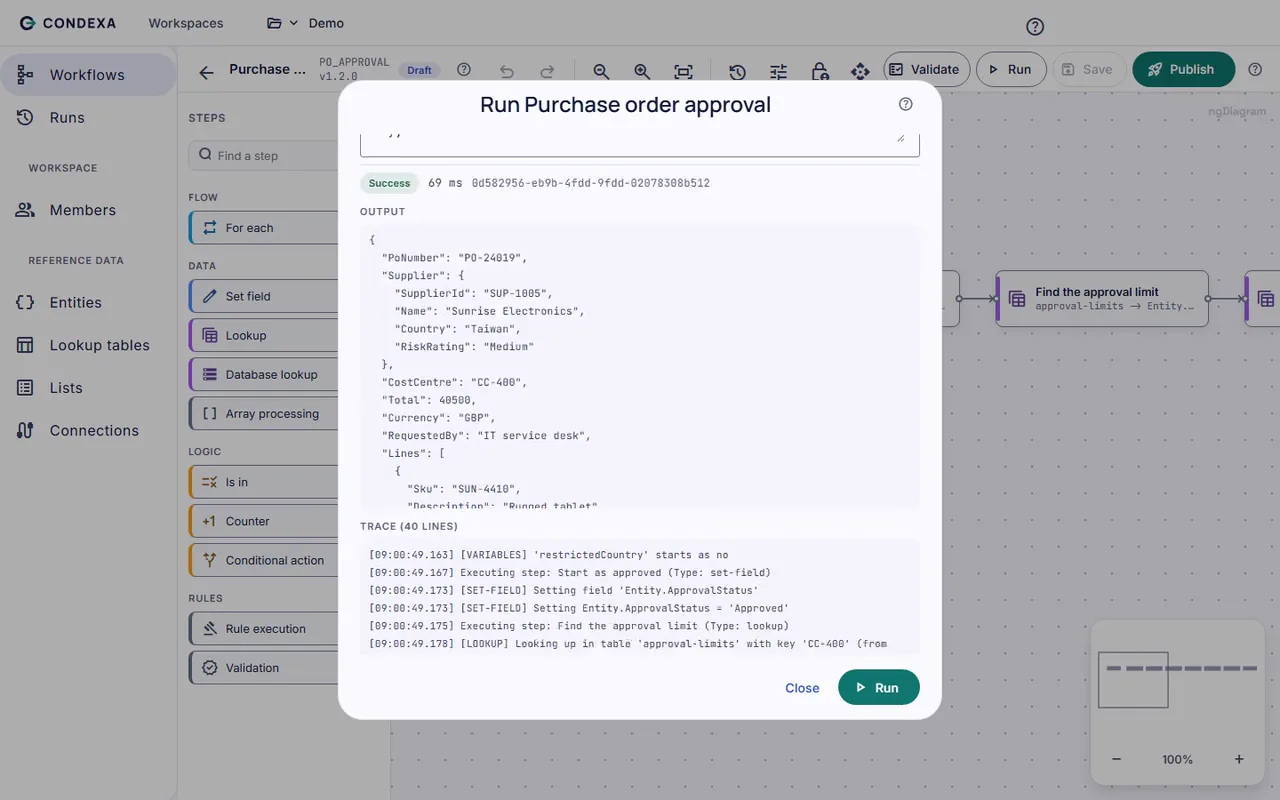
Run a workflow with values you choose, such as a real order or a tricky edge case. The trace appears straight away.
- 2
Read every step
The trace shows each step in order, every lookup and the row it matched, every value that was set and how long each step took.
- 3
Find it again months later
Once published, every call from your systems is saved in run history with its trace, so the explanation is there when audit or a customer asks.
A worked example
Worked example: reading a trace
Sales asks why order SO-20514 for 14,000 GBP was put on hold when the customer has been trading for years.
The rules, in plain English
- R1Step 1 looked up the customer's credit limit: 20,000 GBP.
- R2Step 2 read the outstanding balance: 8,300 GBP.
- R3Step 3 added the order to the balance: 22,300 GBP, over the limit.
- R4Step 4 checked the key accounts list: not found, so no referral.
Condexa answers
Hold, on credit limit. The trace shows the order would take the balance 2,300 GBP over the limit, and the customer is not on the key accounts list. Sales can see the reason in seconds, and credit can decide whether to raise the limit.
FAQ
Questions people ask
What is a decision audit trail?
A decision audit trail is a record of how an automated decision was reached: the inputs it received, the rules and data it used, and the answer it gave. A good one lets someone who did not build the system understand the reason without reading code.
How do I find out why a system made a decision?
If the decision runs in Condexa, open the run in run history. The trace shows every step, every lookup, every value and the output, along with when it ran. If the decision is buried in application code, you usually have to rebuild it by hand from logs and data.
What are explainable decisions?
Explainable decisions are automated decisions where the reason for each outcome can be shown in plain terms. With rules-based decisions like Condexa's, every answer can be traced back to specific rules and values rather than a black box.
Does tracing slow decisions down?
No noticeable amount for callers. Decisions are compiled, and cached decisions answer in milliseconds while their runs are still recorded in run history.
Can I test a rule before it goes live?
Yes. Run any workflow with your own example values and read the trace before you publish. Draft versions do not affect the systems that call the Active version.
Keep exploring
Related decisions and guides
Problems
Unexplained decisions
Can you explain why the system declined that order? Keep a step-by-step record behind every automated answer.
Read moreUse cases
Credit decisions
Decide who gets credit, and how much, the same way every time, without waiting for the one person who knows the rules.
Read moreFeatures
Versioning
Nervous about changing a live rule? Draft it, test it, publish it, and keep every earlier version to fall back on.
Read moreIndustries
Financial services
When a customer or auditor asks why they were declined, show the exact rule, the data it used and the version in force.
Read moreNever again answer 'why?' with 'let me look into it'
Bring a decision your team makes every week. We will build it with you, live, test it against your own examples and show your systems calling it.
No slides. Your decision, built live. No obligation.