
No-code decision automation for operations, finance and IT
Get your business rules out of code, spreadsheets and people's heads.
Write each decision down once. Test it, see exactly why every answer was given, and let your ERP, CRM and Dynamics 365 ask Condexa for the answer in milliseconds.
Plain English
Built on a canvas, not in code
See exactly why
A full trace behind every answer
Change it today
Not in the next release
- 0.08ms [TRIGGER] PO-24019 received from ERP, £40,500
- 0.19ms [LOOKUP] approval-limits[CC-400] -> IT, limit £40,000
- 0.34ms [IS-IN] 'Taiwan' in Restricted countries -> no
- 0.60ms [CHECK] Supplier risk rating = Medium
- 0.83ms [COMPARE] £40,500 > £40,000 -> true
- 1.06ms [DECISION] Status = Director approval, approver = Finance Director
Answer
Needs director
1.05 ms, fully traced
Answers the systems you already run:
- Dynamics 365
- Dataverse
- Power Automate
- Power Apps
- SQL Server
- Any REST client
The real problem
Your business makes the same decisions every day. So where do the rules actually live?
Can this customer have credit? Who has to sign off this order? Is this supplier cleared to trade? The rules are known. They are just scattered, invisible and slow to change.
In the code
"It's a two-line change. It'll be in the release after next."
The approval limit your finance director set last quarter is still waiting in the developer backlog.
Sound familiar?In a spreadsheet
"Don't touch column K. Nobody knows what it does."
Credit limits and price bands in a workbook that no system can call and nobody can prove is right.
Sound familiar?In one person's head
"Ask Sarah. She knows how the exceptions work."
When Sarah is on holiday the decisions slow down. When she leaves, they walk out with her.
Sound familiar?Nowhere you can prove
"Why did the system put this customer on hold?"
The auditor asks. The customer asks. Nobody can say which rule applied, or which version of it.
Sound familiar?What it quietly costs you
The same question, answered three different ways.
The ERP says one thing, the spreadsheet says another and the person on the phone says a third. None of them can tell you why. So orders wait, exceptions pile up in inboxes, and a simple policy change takes a quarter.
- 01
Orders stall
Approvals sit in inboxes because nobody is sure who is allowed to say yes.
- 02
Policy changes queue up
Finance changes a limit on Monday. The system catches up months later.
- 03
Risk slips through
A supplier on the restricted list gets paid because one system never heard about it.
- 04
Audits turn into archaeology
Someone spends a week rebuilding why a decision was made last March.
Try it now
Don't take our word for it. Make a decision.
This is the purchase order approval workflow from our demo workspace, running in your browser. Change the order, then change the rule yourself, and watch the answer and the reason change with it.
1. Your ERP sends an order
2. Now you change the rule
Finance wants a different limit? Drag it. That is the whole change request.
Decision
Director approval
Routed to Finance Director
Why
- £40,500 is over the IT limit of £40,000
How it works
From 'ask Sarah' to an answer every system can call
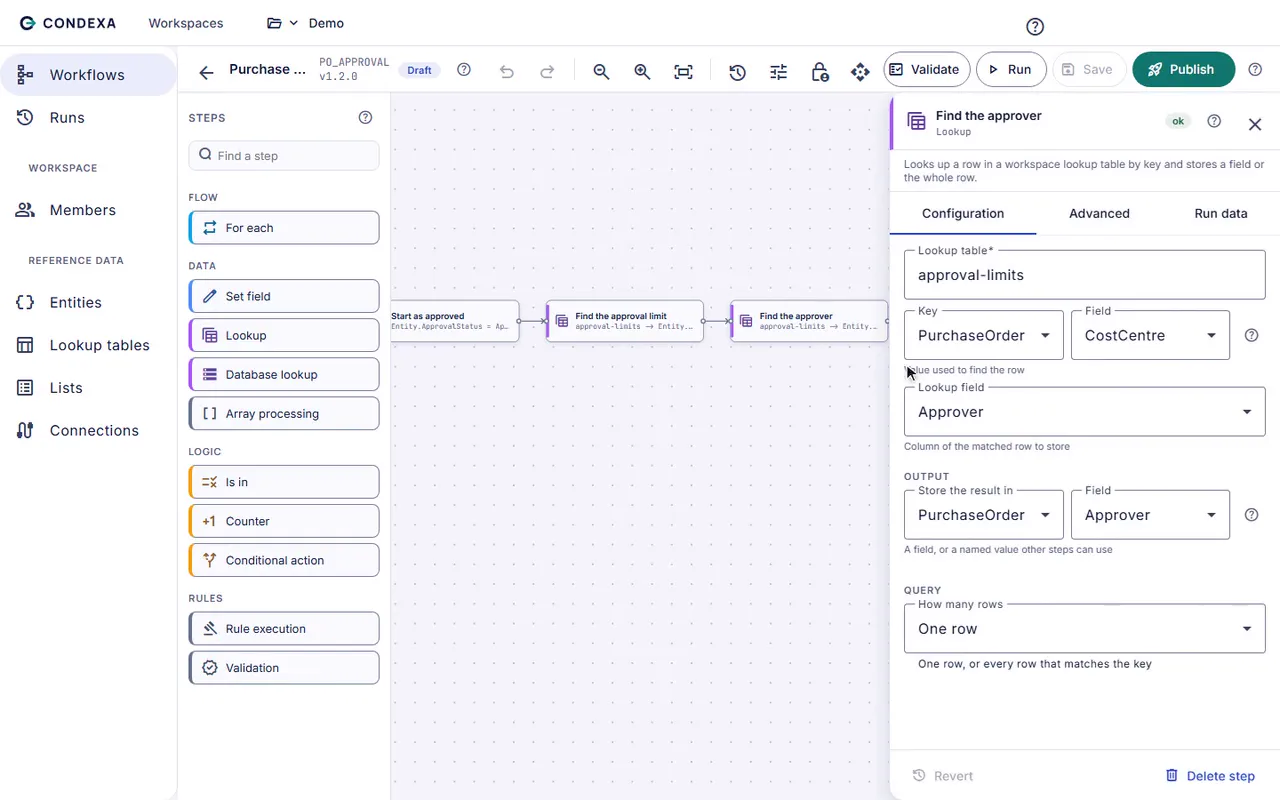
These are real recordings of the Condexa designer. No mock-ups.
What changes
Decisions your business owns, your systems trust and your auditors can read
The people who own the policy change it
Finance moves an approval limit in a lookup table, tests it and publishes it. No ticket, no release, no waiting for the next sprint.
Change rules without developers →Every system gets the same answer
Your ERP, CRM, Dynamics 365 forms and Power Automate flows all ask Condexa, so a rule changed once is changed everywhere.
See integrations →Every answer comes with its reasons
Each run records which version answered, which values it saw and which rule decided. 'Why did it say no?' takes seconds, not a week.
See the decision trace →Use cases
Which question costs you the most time?
Start with one decision your team makes hundreds of times a month. Most teams have it running in weeks, not quarters.
Purchase order approval
Who must approve this purchase order? Answered instantly.
Stop chasing sign-off by email. Encode your delegation of authority once and let the ERP know who must approve every PO.
Credit decisions
Can this customer have credit? Decide it the same way, every time.
Decide who gets credit, and how much, the same way every time, without waiting for the one person who knows the rules.
Supplier onboarding
Is this supplier ready to trade?
Check every new supplier against the same criteria before the first order, not after something goes wrong.
Pricing and discounts
What discount can this rep give? Answered before the quote goes out.
Stop discount requests bouncing round by email. Apply price bands and limits consistently and route only the exceptions.
Compliance checks
Does this transaction pass our policy? Checked on every one.
Your policies say what must be checked. Make sure it happens on every transaction, with proof of which rule applied.
Claims and eligibility
Is this claim eligible? Decide it the same way, and explain it.
Decide who qualifies and route every claim with clear rules, so the answer never depends on who picked it up.
For Dynamics 365 and Power Platform teams
Outgrown Dataverse business rules?
Form-level rules cannot look things up, cannot be reused across apps and cannot tell you why. Condexa reads your Dataverse tables live, answers Dynamics 365, Power Apps and Power Automate, and keeps a trace of every decision.
POST /api/workspaces/{id}/workflows/PO_APPROVAL/execute
{
  "inputData": {
    "PoNumber": "PO-24019",
    "CostCentre": "CC-400",
    "Total": 40500
  }
}
200 OK
{
  "status": "success",
  "outputData": {
    "ApprovalStatus": "Director approval",
    "Approver": "Finance Director"
  }
}
FAQ
The questions we get asked first
Is Condexa another system for IT to look after?
Condexa sits beside the systems you already run and answers their questions over a simple API. IT sets up the connections and API keys once; after that, the people who own each policy change the rules themselves, with versions and a trace, so IT stops being the bottleneck for threshold changes.
Do we need developers to build decisions in Condexa?
No. Decisions are built on a visual canvas from plain-English steps such as look up, compare, check a list and set a value. A developer is only needed once, to make your ERP, CRM or app call the decision, which is a single HTTP request.
How is this different from Power Automate or our ERP's workflow?
Workflow tools move work from one place to the next. Condexa decides what the answer should be, and why, so the same rule gives the same answer in every system. Many teams use both: Power Automate or the ERP asks Condexa for the decision and then acts on it.
What happens if we get a rule wrong?
You test every change against your own examples before publishing, and every published version is kept. If something needs undoing, you activate the previous version. Run history shows which version answered every request, so you can see who was affected.
How fast are the answers?
Workflows are compiled and cached, so a published decision answers in milliseconds. That is fast enough to sit inside order entry, quoting or a Dynamics 365 form without anyone noticing.
Pick one decision. See it running in 30 minutes.
Bring a decision your team makes every week. We will build it with you, live, test it against your own examples and show your systems calling it.
No slides. Your decision, built live. No obligation.